請先將 Newtonsoft.Json.dll 檔案放到 Unity 專案底下,即可開始使用。
using UnityEngine;
using System.Collections;
using Newtonsoft.Json;
public class Book
{
public int ID { get; set; }
public string Name { get; set; }
public string Author { get; set; }
}
public class Test : MonoBehaviour
{
void Start ()
{
Book book = new Book ();
book.ID = 1;
book.Name = "Push Loli ( Getting Started )";
book.Author = "Alice";
// Json Encoding
string output = JsonConvert.SerializeObject (book);
print (output);
// Json Decoding
Book book2 = JsonConvert.DeserializeObject<Book> (output);
print ("ID : " + book2.ID);
print ("Name : " + book2.Name);
print ("Author : " + book2.Author);
}
}
輸出結果:
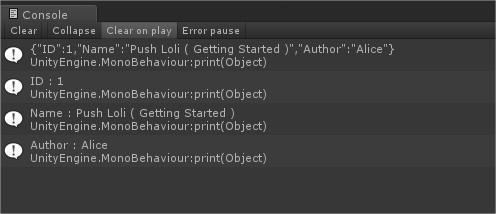
以下是上面的精簡版:
using UnityEngine;
using System.Collections;
using Newtonsoft.Json;
public class Test : MonoBehaviour{
void Start (){
string output = JsonConvert.SerializeObject(
new{
ID = "5",
Name = "Loli",
Author = "Yen Lin"
}
);
print (output);
Temp t = JsonConvert.DeserializeObject<Temp>(output);
print (t.ID);
print (t.Name);
print (t.Author);
}
}
class Temp{
public string ID,Name,Author;
}
高級版:
using UnityEngine;
using System.Collections;
using Newtonsoft.Json;
using System.Collections.Generic;
public class Book
{
public int ID ;
public string Name ;
public string Author;
public List<string> ListData = new List<string> ();
}
public class RootLibrary
{
// Value name (Library) is Json root "Name".
public List<Book> Library = new List<Book> ();
}
public class Test : MonoBehaviour
{
void Start ()
{
// Json Path : Library.book
Book book = new Book ();
book.ID = 1;
book.Name = "Unity Book";
book.Author = "Bee";
book.ListData.Add ("Box");
book.ListData.Add ("Banana");
book.ListData.Add ("Ball");
// Json Path : Library.book2
Book book2 = new Book ();
book2.ID = 2;
book2.Name = "C# Book";
book2.Author = "God";
book2.ListData.Add ("Man");
book2.ListData.Add ("Boy");
book2.ListData.Add ("Girl");
// Json Path : Library.book3
Book book3 = new Book ();
book3.ID = 3;
book3.Name = "Loli Book";
book3.Author = "Alice";
book3.ListData.Add ("Cat");
book3.ListData.Add ("Dog");
book3.ListData.Add ("Apple");
// Json Path : Library (Root)
RootLibrary lib = new RootLibrary ();
lib.Library.Add (book);
lib.Library.Add (book2);
lib.Library.Add (book3);
// Json Encoding
string output = JsonConvert.SerializeObject (lib);
print (output);
//--------------------------------------------------------------
// Json Decoding
RootLibrary _lib = JsonConvert.DeserializeObject<RootLibrary> (output);
foreach (Book _book in _lib.Library) {
print ("----------------------------------");
print ("ID : " + _book.ID);
print ("Name : " + _book.Name);
print ("Author : " + _book.Author);
for (int i =0; i<_book.ListData.Count; i++) {
print ("ListData [ " + i + " ] : " + _book.ListData [i]);
}
}
}
}
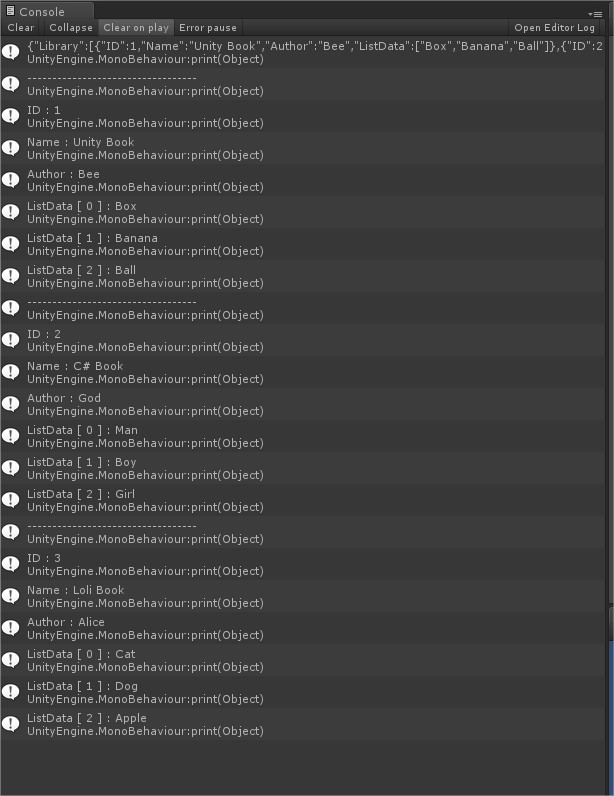
輸出結果(第一行因為太長了所以被切斷,所以我自行排版後並上傳文字結果):
{
"Library":
[
{
"ID":1,
"Name":"Unity Book",
"Author":"Bee",
"ListData":["Box","Banana","Ball"]
},
{
"ID":2,
"Name":"C# Book",
"Author":"God",
"ListData":["Man","Boy","Girl"]
},
{
"ID":3,
"Name":"Loli Book",
"Author":"Alice",
"ListData":["Cat","Dog","Apple"]
}
]
}
Json 查詢:
using UnityEngine;
using System.Collections;
using System.Collections.Generic;
using Newtonsoft.Json;
using Newtonsoft.Json.Linq;
public class RootLibrary
{
public string Type;
}
public class Test : MonoBehaviour
{
void Start ()
{
RootLibrary lib = new RootLibrary ();
lib.Type = "BookLibrary";
// Json Encoding
string output = JsonConvert.SerializeObject (lib);
print (output);
//--------------------------------------------------------------
// Json Decoding
JObject obj = JsonConvert.DeserializeObject<JObject> (output);
print (obj.GetValue("Type"));
print (obj["Type"]);
}
}
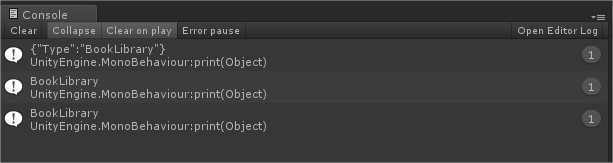
輸出結果:
Json、Bson 綜合應用:
using UnityEngine;
using System;
using System.IO;
using System.Collections.Generic;
using Newtonsoft.Json;
using Newtonsoft.Json.Bson;
using Newtonsoft.Json.Linq;
public class Test : MonoBehaviour {
void Start () {
var info = new List<object> {
new{
Date = DateTime.Now,
name = "Moe Loli A",
Age = 5,
NumberA = new int[]{000,111,222},
NumberB = new List<int> {2, 1, 0}
},
new{
Date = DateTime.Now.AddDays(1),
name = "Moe Loli B",
Age = 7,
NumberA = new int[]{333,444,555},
NumberB = new List<int> {5, 4, 3}
},
new{
Date = DateTime.Now.AddDays(2),
name = "Moe Loli C",
Age = 10,
NumberA = new int[]{666,777,888},
NumberB = new List<int> {8, 7, 6}
}
};
var data = new{info};
//-------------------- Json :
// Serialize
string json = JsonConvert.SerializeObject(data, Formatting.Indented);
// Deserialize
JObject Jobj = JsonConvert.DeserializeObject<JObject> (json);
// Print
print ("Json : " + json);
JArray ja = Jobj ["info"] as JArray;
foreach(JObject obj in ja){
DateTime date = (DateTime) obj["Date"];
print ("Json : " + date);
// 時間搜尋
// if(date > DateTime.Now){
// print (date + " > " + DateTime.Now);
// }
}
print ("-----------------------------------");
//-------------------- Bson :
// Serialize
byte[] bson = new byte[]{};
using(MemoryStream stream = new MemoryStream()){
using (BsonWriter writer = new BsonWriter(stream)){
new JsonSerializer().Serialize(writer, data);
}
bson = stream.ToArray();
}
// Deserialize
JObject Bobj;
using (var stream = new MemoryStream(bson)){
using (BsonReader reader = new BsonReader(stream)){
JsonSerializer serializer = new JsonSerializer();
Bobj = serializer.Deserialize<JObject>(reader);
}
}
// Print
print ("Bson : " + Bobj);
JArray ja2 = Bobj ["info"] as JArray;
foreach(JObject obj in ja2){
DateTime date = (DateTime) obj["Date"];
print ("Bson : " + date);
// 時間搜尋
// if(date > DateTime.Now){
// print (date + " > " + DateTime.Now);
// }
}
}
}
輸出結果:

Jarray 後續 增加:
using UnityEngine;
using System.Collections;
using Newtonsoft.Json;
using Newtonsoft.Json.Linq;
using System.Collections.Generic;
using System;
public class Test : MonoBehaviour {
void Start () {
var Food = new List<object> (){
new {
Date = DateTime.Now,
Name = "AAA",
Kal = "BBB"
}
};
string JsonFoodData;
JsonFoodData = JsonConvert.SerializeObject(new{Food},Formatting.Indented);
print (JsonFoodData);
//-------------------------------
JObject Jobj = JsonConvert.DeserializeObject<JObject> (JsonFoodData);
JArray Jarr = Jobj["Food"] as JArray;
Food = Jarr.ToObject<List<object>>();
Food.Add (
new {
Date = DateTime.Now,
Name = "CCC",
Kal = "DDD"
}
);
JsonFoodData = JsonConvert.SerializeObject(new{Food},Formatting.Indented);
print (JsonFoodData);
}
}
輸出結果:


請先 登入 以發表留言。