PIXNET Logo登入

彥霖 實驗筆記

跳到主文

個人筆記...

部落格全站分類:數位生活

  • 相簿
  • 部落格
  • 留言
  • 名片
  • 7月 28 週一 201416:21
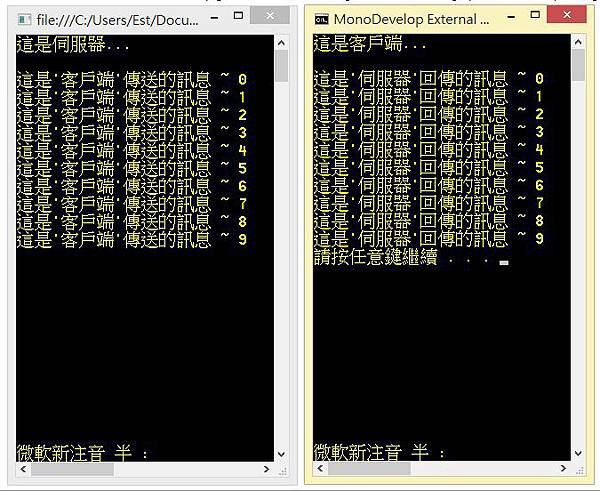
  • C# 入門教學:最小 TCP Server (單執行緒)

// 先匯入
using System;
using System.Net;
using System.Net.Sockets;
using System.IO;
(繼續閱讀...)
文章標籤

黃彥霖 發表在 痞客邦 留言(0) 人氣(4,793)

  • 個人分類:[程式語言] C #
▲top
  • 10月 12 週六 201316:30
  • C# 入門教學:自動 移動滑鼠

using System;
using System.Runtime.InteropServices;
namespace ttt
{
    class MainClass
    {
        [DllImport("user32")]
        static extern bool SetCursorPos(int X, int Y);
        public static void Main (string[] args)
        {
            SetCursorPos(0, 0);  // 編譯執行後,會自動把滑鼠移到左上角 x = 0 , y = 0 的位置
        }
    }
}
(繼續閱讀...)
文章標籤

黃彥霖 發表在 痞客邦 留言(1) 人氣(5,114)

  • 個人分類:[程式語言] C #
▲top
  • 3月 11 週一 201322:56
  • C# 開啟外部檔案

請先匯入:using System.Diagnostics;
 
寫法一:
(繼續閱讀...)
文章標籤

黃彥霖 發表在 痞客邦 留言(5) 人氣(13,788)

  • 個人分類:[程式語言] C #
▲top
  • 2月 02 週六 201306:25
  • C# TCP 客戶端 2 種 (最小精簡) 寫法:

    依造個人需求,在使用TCP設計客戶端(Client)時,有時候使用Socket方便;有時候使用TcpClient方便。所以今天我提供2種常使用與容易使用的方式,且不需要事先宣告byte[]來當作緩衝(Buffer),也不需要用迴圈把byte一個一個讀取出來。如此一來可以專心在商業邏輯上,加快程式的選寫速度與維護。
方法一 使用 Socket:
using System;
using System.Net;
using System.Net.Sockets;
using System.IO;

class Program
{
static void Main(string[] args)
{
Socket socket = new Socket(AddressFamily.InterNetwork, SocketType.Stream, ProtocolType.Tcp);
socket.Connect("61.227.71.237", 1024); // 1.設定 IP:Port 2.連線至伺服器
NetworkStream stream = new NetworkStream(socket);
StreamReader sr = new StreamReader(stream);
StreamWriter sw = new StreamWriter(stream);

sw.WriteLine("你好伺服器,我是客戶端。"); // 將資料寫入緩衝
sw.Flush(); // 刷新緩衝並將資料上傳到伺服器

Console.WriteLine("從伺服器接收的資料: " + sr.ReadLine());

Console.ReadLine();
}
}
(繼續閱讀...)
文章標籤

黃彥霖 發表在 痞客邦 留言(0) 人氣(34,729)

  • 個人分類:[程式語言] C #
▲top
  • 1月 31 週四 201322:44
  • 基於 P2P 的UDP Nat/防火牆 穿透技術:Java Server & C# Client

ccccccccccccccccc// 本範例不適合用於對稱行網路,要解決此問題請先讓 Client 連線至 Server ,讓 Client 知道自己的 (公開/內部 IP ) 與其他人的 (公開/內部 IP ) ,再檢查自己公開 IP 是否與其他人的公開 IP 重複,如果有重複代表自己處於對稱行網路中,將使用內部 IP 進行通訊即可。
 Java 伺服器程式碼:
 
package javaapplication1;

import java.net.*;
import java.util.ArrayList;
import java.util.HashMap;

public class JavaApplication1 {

public static void main(String[] args) throws Exception {
byte[] buffer = new byte[65507];
DatagramPacket dp = new DatagramPacket(buffer, buffer.length);
DatagramSocket ds = new DatagramSocket(5555); // Set Server Port
System.out.println("伺服器啟動於 : "
+ InetAddress.getLocalHost().getHostAddress() + ":" + ds.getLocalPort());
String msg = "No Message...";
HashMap map = new HashMap();
while (true) {
dp = new DatagramPacket(buffer, buffer.length);
ds.receive(dp);
msg = new String(dp.getData(), 0, dp.getLength());

String ipPort = dp.getAddress().getHostAddress() + ":" + dp.getPort();
// 只要一連線就會把 IP 放進 map 裡
map.put(ipPort, "");
System.out.println(ipPort + " 傳來的訊息 : " + msg);

// 回傳他們自己的 外網IP
dp = new DatagramPacket(ipPort.getBytes(), ipPort.length(), dp.getAddress(), dp.getPort());
ds.send(dp);


// 如果 2 個人上線了...
if (map.size() == 2) {
ArrayList a = new ArrayList();
for (Object ip_Port : map.keySet()) {
a.add(ip_Port.toString());
}
for (Object ip_Port : map.keySet()) {
String temp = "";
for (int i = 0; i < a.size(); i++) {
// 如果現在這個IP不等於之前存放在 map 裡的IP
// 簡單來說就是只要獲取對方的IP,並不需要用到自己的IP
if (!a.get(i).equals(ip_Port)) {
temp += a.get(i);
}
}
// 為每個連線端發送對方的 IP:Port
dp = new DatagramPacket(temp.getBytes(), temp.length(), getIP(ip_Port), getPort(ip_Port));
ds.send(dp);
}
}
}
}

static InetAddress getIP(Object ipPort) throws UnknownHostException {
return InetAddress.getByName(ipPort.toString().split(":")[0]);
}

static int getPort(Object ipPort) {
return Integer.valueOf(ipPort.toString().split(":")[1]);
}
}
(繼續閱讀...)
文章標籤

黃彥霖 發表在 痞客邦 留言(7) 人氣(3,503)

  • 個人分類:[程式語言] C #
▲top
  • 1月 31 週四 201300:40
  • C# 基於 UDP-Socket 的 UdpClient 使用方法

aaa    這邊主要的重點是 UdpClient 這個類別,雖然從字面上這個類別叫做 UDP 的 Client (客戶端),但實際上我們也可以用它來建立伺服器,簡單來說 UdpClient 類別可以同時建立 伺服器端 (Server) 與 客戶端 (Client) 兩種功能。
    如果今天要建立伺服器端 UdpClient 則要宣告成 UdpClient uc = new UdpClient(5555); ,這裡的 5555 代表伺服器的 Port (監聽埠)。
(繼續閱讀...)
文章標籤

黃彥霖 發表在 痞客邦 留言(0) 人氣(17,986)

  • 個人分類:[程式語言] C #
▲top
  • 9月 22 週六 201221:19
  • C# 嵌入(加入、載入) FLASH (*.Swf)

dfsdfs  
參考COM - Shockwave Flash
在工具箱按滑鼠右鍵選[選擇項目] COM元件 Shockwave Flash Object
然後再將元件拉到表單上

(繼續閱讀...)
文章標籤

黃彥霖 發表在 痞客邦 留言(0) 人氣(1,688)

  • 個人分類:[程式語言] C #
▲top
  • 6月 20 週三 201220:36
  • C# String 類別的應用

顧名思意,String 類別就是來處理字串的應用 
它提供了一堆靜態方法 (Static Method) 來處理字串相關 
以下介紹一些平時很實用的功能
字串的比較
Compare 方法會回傳整數值,來表示兩個字串的關聯性 
正數表示第一個字串大於第二個字串 
負數表示第一個字串小於第二的字串 
零值表示兩個字串相等 
string.Compare("字串", "測試"); // result = -1 
string.Compare("字串測試", "字串測試"); // result = 0 
string.Compare("字串", "測試"); // result = -1
string.Compare("字串測試", "字串測試"); // result = 0
字串中搜尋字元或子字串
當我們必須想知道某字串中是否有特定字串或字元時 
可以使用 String 類別的 IndexOf 方法來傳回特定字串 (字元) 在字串中的索引位置 
另外,我們也可以利用 LastIndexOf 方法於字串中從後往前找到特定字串並回傳索引位置 
PS. 索引位置由 0 開始 
PS. 在 .NET Framework 下每個中文字都算一字元,而不再是 ASCII 時代的兩字元了 
PS. LastIndexOf 方法和 IndexOf 一樣回傳索引位置,一樣搜尋特定字串,只不過 IndexOf 方法是由前往後找,但 LastIndexOf 方法是由後往前找 
"字串測試字串測試".IndexOf("串"); // result = 1 
"字串測試字串測試".IndexOf("串測"); // result = 1 
"字串測試字串測試".LastIndexOf("串測"); // result = 5 
"字串測試字串測試".IndexOf("串"); // result = 1
"字串測試字串測試".IndexOf("串測"); // result = 1
"字串測試字串測試".LastIndexOf("串測"); // result = 5
字串轉換大小寫
ToUpper 及 ToLower 方法可以將字串全部轉換成大寫或小寫 
並將結果回傳成新的字串 
"abcdABCD".ToUpper(); // result = "ABCDABCD" 
"abcdABCD".ToLower(); // result = "abcdabcd" 
"abcdABCD".ToUpper(); // result = "ABCDABCD"
"abcdABCD".ToLower(); // result = "abcdabcd"
去除或添加字串前後空白字元或特定字元
我們可以用 Trim 方法去除字串前後的空白字元 
而 TrimStart 及 TrimEnd 可以只移除前後的空白字元 
另外 Trim, TrimStart, TrimEnd 方法除了可以移除空白字元外,還可以移除一個或多個字元 
"字字串串測測試試".Trim("字試".ToCharArray()); // result = "串串測測" 
"字串測試".Trim("串字試".ToCharArray()); // result = "測" 
"字串測試".TrimStart(new char[] { '試', '字', '串' }); // result = "測試" 
"字串測試".TrimEnd("串試字".ToCharArray()); // result = "字串測" 
"字字串串測測試試".Trim("字試".ToCharArray()); // result = "串串測測"
"字串測試".Trim("串字試".ToCharArray()); // result = "測"
"字串測試".TrimStart(new char[] { '試', '字', '串' }); // result = "測試"
"字串測試".TrimEnd("串試字".ToCharArray()); // result = "字串測"
字串前後添加空白字元或特定字元
PadLeft 及 PadRight 方法則和上例功能相反 - 將字串前後補上空白字元或特定字元 
方法中第一個參數則是決定補上字元後的總長度 
如果原字串就比第一個參數小了,則就不補上字元了 
// 字串前補上 '@' 字元到長度 10 
"字串測試".PadLeft(10, '@'); // result = "@@@@@@字串測試" 
// 字串長度比 2 小,則不補上 '@' 字元 
"字串測試".PadRight(2, '@'); // result = "字串測試" 
// 字串前補上 '@' 字元到長度 10
"字串測試".PadLeft(10, '@'); // result = "@@@@@@字串測試"
// 字串長度比 2 小,則不補上 '@' 字元
"字串測試".PadRight(2, '@'); // result = "字串測試"
在字串中插入字串、移除字串和取代字串
我們可以用 Insert, Remove, Replace 來處理字串的插入、移除、取代 
這三個方法用法還滿直覺簡單 
PS. Remove 只可以移除指定位置的指定長度字串,而無法帶入要移除的字串 
但是其實可以利用 Replace 來做指定字串的移除 
"字串測試".Insert(2, "ABCD"); // result = "字串ABCD測試" 
"字串測試".Remove(1, 2); // result = "字試" 
"字串測試".Replace("串測", "ABCD"); // result = "字ABCD試" 
"字串測試".Replace("串測", string.Empty); // result = "字試" 
"字串測試".Insert(2, "ABCD"); // result = "字串ABCD測試"
"字串測試".Remove(1, 2); // result = "字試"
"字串測試".Replace("串測", "ABCD"); // result = "字ABCD試"
"字串測試".Replace("串測", string.Empty); // result = "字試"
串連字串陣列及分隔
這兩個方法 Join 及 Split 但很少人用但很實用 
尤其是 join 方法,因為有許多組合方法可以取代它的功能 
雖然 Join 其有所限制,如串連前必須得知所有的字串,而不能將字串持續串連下去 
但其實在某些場合之下還滿好用的 
PS. Join 方法遇到字串陣列中有空字串時,還是會串連進回傳的字串中 
string.Join("+", new string[] { "一", "二", "三", "四", "五" }); // result = "一+二+三+四+五" 
"一+二+三+四+五".Split("+"); // result = 字串陣列 
string.Join("+", new string[] { "一", "二", "三", "四", "五" }); // result = "一+二+三+四+五"
"一+二+三+四+五".Split("+"); // result = 字串陣列
取得子字串
最後一個方法,也是很常用很實用的方法 - 取出子字串 Substring 方法 
"字串測試".Substring(1, 2); // result = "串測"
(繼續閱讀...)
文章標籤

黃彥霖 發表在 痞客邦 留言(1) 人氣(11,616)

  • 個人分類:[程式語言] C #
▲top
  • 6月 20 週三 201219:57
  • C#中分割的幾種使用方法

第一种方法:
            string s = "abcdeabcdeabcde";
            string[] sArray = s.Split('c');
            foreach (string i in sArray)
                Console.WriteLine(i.ToString());
            Console.ReadKey();
输出下面的结果:
ab
deab
deab
de
(繼續閱讀...)
文章標籤

黃彥霖 發表在 痞客邦 留言(0) 人氣(52,067)

  • 個人分類:[程式語言] C #
▲top
  • 5月 18 週五 201215:24
  • C# UDP 客戶端傳資料至伺服器端(UDP Client to Server)


// 伺服器程式碼 -------------------------------------------------------------------------------
using System;
using System.Text;
using System.Net;
using System.Net.Sockets;
 
namespace g
{
    class MainClass
    {
        public static void Main(string[] args)
        {
            UdpClient uc = new UdpClient(80);
            // 公開IP
            // IPEndPoint ipep = new IPEndPoint(IPAddress.Parse("114.47.91.248"), 80); 
            // 內部IP,但外部還是可以連近來
            IPEndPoint ipep = new IPEndPoint (IPAddress.Parse ("192.168.0.80"), 80);   
            Console.WriteLine("伺服器已啟動於 : " + ipep);
            while (true)
            {
                Console.WriteLine(System.Text.Encoding.UTF8.GetString(uc.Receive(ref ipep)));
            }
        }
    }
}
 
 
// 客戶端程式碼 -------------------------------------------------------------------------------
using System;
using System.Collections.Generic;
using System.Linq;
using System.Text;
using System.Net;
using System.Net.Sockets;
 
namespace ConsoleApplication1
{
    class Program
    {
        static void Main(string[] args)
        {
            UdpClient uc = new UdpClient();
            byte[] b = System.Text.Encoding.UTF8.GetBytes("Hello 你好 ~");
            uc.Send(b, b.Length, new IPEndPoint(IPAddress.Parse("114.47.91.248"), 80));
        }
    }
}
(繼續閱讀...)
文章標籤

黃彥霖 發表在 痞客邦 留言(0) 人氣(1,107)

  • 個人分類:[程式語言] C #
▲top
12»

實驗人員

黃彥霖
暱稱:
黃彥霖
分類:
數位生活
好友:
累積中
地區:

文章分類

  • [遊戲設計] Unity (100)
  • [程式語言] Java (91)
  • [程式語言] Go (31)
  • [程式語言] C # (15)
  • [程式語言] Python 3 (11)
  • [程式語言] Erlang (2)
  • [程式語言] Python 2 (2)
  • [程式語言] C++ (10)
  • [程式語言] C (8)
  • [程式語言] Node.js (5)
  • [程式語言] JavaScript (8)
  • [程式語言] Java-Android (2)
  • [資料庫] PostgreSQL (28)
  • [資料庫] Hadoop (2)
  • [作業系統] Linux (23)
  • [作業系統] Windows (3)
  • [作業系統] FreeRTOS (1)
  • [單晶片] Arduino (19)
  • [單晶片] ARM-STM32-F4 (15)
  • [單晶片] ARM-STM32-F1 (13)
  • [單晶片] ARM-LPC1114 (1)
  • [單晶片] PIC33FJ128MC804 (4)
  • [硬體設計] 常用IC (1)
  • [硬體設計] 3D 印表機 (3)
  • [硬體設計] 其他 (4)
  • [數學+程式語言] Matlab (4)
  • [數學] 應用數學 (2)
  • [論壇架設] Discuz! (1)
  • [科技新聞] 機器人 (3)
  • [轉碼工具] FFMPEG (1)
  • [檔案格式] 3D 檔案 (1)
  • [程式語言] 程式設計經驗談 (2)
  • [伺服器] GlassFish 筆記 (1)
  • [網頁] HTML 教學 (5)
  • [網頁] CSS 語法 (1)
  • [網頁] JSP / Servlet (7)
  • [網路監控] SmartSniff (1)
  • [虛擬機器] VirtualBox (1)
  • [電腦安全] 開發者 (1)
  • [美術設計] 繪畫 (0)
  • [3D設計] Blender 教學 (2)
  • [3D設計] Blender 外掛設計 (1)
  • [2D設計] GIMP Python (2)
  • [3D設計] Shroud Studio (3)
  • [展示] 作品、比賽、專題 (4)
  • [人類語言] 希伯來語 (1)
  • [金融] 外匯 (1)
  • 未分類文章 (1)

FB 粉絲頁

參觀人氣

  • 本日人氣:
  • 累積人氣: