// 本範例不適合用於對稱行網路,要解決此問題請先讓 Client 連線至 Server ,讓 Client 知道自己的 (公開/內部 IP ) 與其他人的 (公開/內部 IP ) ,再檢查自己公開 IP 是否與其他人的公開 IP 重複,如果有重複代表自己處於對稱行網路中,將使用內部 IP 進行通訊即可。
Java 伺服器程式碼:
 package javaapplication1;

import java.net.*;
import java.util.ArrayList;
import java.util.HashMap;

public class JavaApplication1 {

    public static void main(String[] args) throws Exception {
        byte[] buffer = new byte[65507];
        DatagramPacket dp = new DatagramPacket(buffer, buffer.length);
        DatagramSocket ds = new DatagramSocket(5555); // Set Server Port
        System.out.println("伺服器啟動於 : "
                + InetAddress.getLocalHost().getHostAddress() + ":" + ds.getLocalPort());
        String msg = "No Message...";
        HashMap map = new HashMap();
        while (true) {
            dp = new DatagramPacket(buffer, buffer.length);
            ds.receive(dp);
            msg = new String(dp.getData(), 0, dp.getLength());

            String ipPort = dp.getAddress().getHostAddress() + ":" + dp.getPort();
            // 只要一連線就會把 IP 放進 map 裡
            map.put(ipPort, "");
            System.out.println(ipPort + " 傳來的訊息 : " + msg);

            // 回傳他們自己的 外網IP
            dp = new DatagramPacket(ipPort.getBytes(), ipPort.length(), dp.getAddress(), dp.getPort());
            ds.send(dp);


            // 如果 2 個人上線了...
            if (map.size() == 2) {
                ArrayList a = new ArrayList();
                for (Object ip_Port : map.keySet()) {
                    a.add(ip_Port.toString());
                }
                for (Object ip_Port : map.keySet()) {
                    String temp = "";
                    for (int i = 0; i < a.size(); i++) {
                        // 如果現在這個IP不等於之前存放在 map 裡的IP
                        // 簡單來說就是只要獲取對方的IP,並不需要用到自己的IP
                        if (!a.get(i).equals(ip_Port)) {
                            temp += a.get(i);
                        }
                    }
                    // 為每個連線端發送對方的 IP:Port
                    dp = new DatagramPacket(temp.getBytes(), temp.length(), getIP(ip_Port), getPort(ip_Port));
                    ds.send(dp);
                }
            }
        }
    }

    static InetAddress getIP(Object ipPort) throws UnknownHostException {
        return InetAddress.getByName(ipPort.toString().split(":")[0]);
    }

    static int getPort(Object ipPort) {
        return Integer.valueOf(ipPort.toString().split(":")[1]);
    }
}
C# 客戶端程式碼:
 using System;
using System.Net;
using System.Net.Sockets;
using System.Threading;


class MyClient
{
    public static UdpClient uc = null;
    public static IPEndPoint otherIP = null;

    static void Main(string[] args)
    {
        // 伺服器的 IP 與 Port
        IPEndPoint servrIP = new IPEndPoint(IPAddress.Parse("122.121.9.25"), 5555);
        // 自訂要監聽的 Port
        IPEndPoint myIP = new IPEndPoint(IPAddress.Any, 4444);
        uc = new UdpClient(myIP.Port);
        string receive;
        byte[] b;

        // 向伺服器傳資料:
        b = System.Text.Encoding.UTF8.GetBytes("Hello Server");
        uc.Send(b, b.Length, servrIP);

        // 從伺服器取得目前電腦的IP:
        string myPublicIP = System.Text.Encoding.UTF8.GetString(uc.Receive(ref servrIP));
        Console.WriteLine("目前電腦的IP:" + myPublicIP);
        Console.WriteLine("\n|-----------------------------------|\n");

        // 從伺服器取得對方IP:
        receive = System.Text.Encoding.UTF8.GetString(uc.Receive(ref servrIP));
        otherIP = new IPEndPoint(IPAddress.Parse(receive.Split(':')[0]), int.Parse(receive.Split(':')[1]));

        // 打洞:
        b = System.Text.Encoding.UTF8.GetBytes("Hi");
        uc.Send(b, b.Length, otherIP);

        // 為監聽{uc.Receive()}建立一條執行緒:
        // ( 1.接收/2.發送 兩種功能建議個別建立執行緒
        // 如果沒有建立執行緒程式可能會鎖死 )
        new Thread(new MyReceiveThreadClass().MyRun).Start();

        // 傳送真正的資料:
        int i = 0;
        while (true)
        {
            b = System.Text.Encoding.UTF8.GetBytes("這是 " + myPublicIP + " 資料 : " + i++);
            uc.Send(b, b.Length, otherIP);
            //Thread.Sleep(1000);
        }
    }
}

class MyReceiveThreadClass
{
    public void MyRun()
    {
        while (true)
        {
            string receive = System.Text.Encoding.UTF8.GetString(MyClient.uc.Receive(ref MyClient.otherIP));
            Console.WriteLine(receive);
        }
    }
}
伺服器輸出結果:

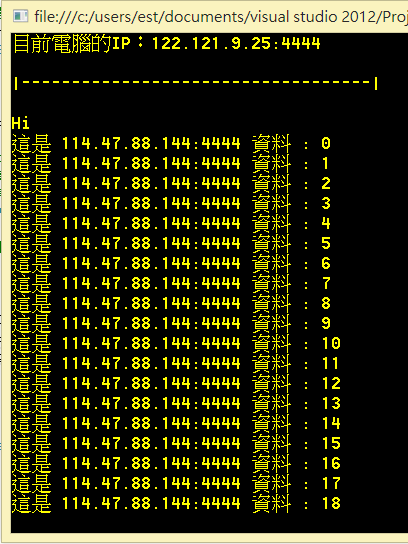
客戶端 1 輸出結果:
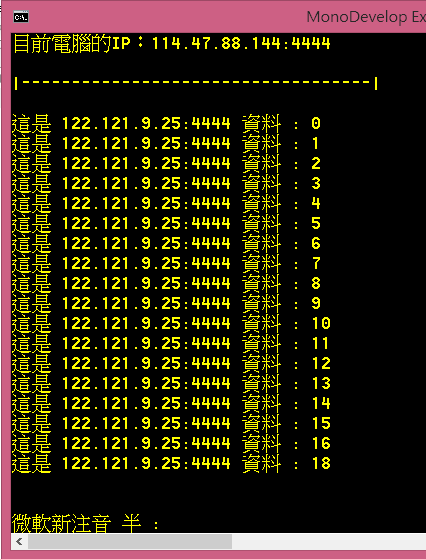
客戶端 2 輸出結果:
C# Unity 版本:
using UnityEngine;
using System.Collections;
using System;
using System.Net;
using System.Net.Sockets;
using System.Threading;
public class MyClient : MonoBehaviour {
public static UdpClient uc = null;
public static IPEndPoint otherIP = null;
byte[] b;
string myPublicIP = "No";
string OtherSidePublicIP = "No";
string sendMsg = "No";
string receiveMsg = "No";
bool isRun = true;
// Unity Override Methods ========================================================================
void Awake () {
new Thread(P2P_Init).Start();
}
void Update(){
SendData ();
}
void OnGUI(){
GUILayout.Label ("本機電腦的IP:" + myPublicIP);
GUILayout.Label ("對方電腦的IP:" + myPublicIP);
GUILayout.Label ("送出的訊息:" + sendMsg);
GUILayout.Label ("接收的訊息:" + receiveMsg);
}
void OnDisable(){
isRun = false;
if(uc != null){
uc.Close();
}
}
// Custom Methods ===============================================================================
void P2P_Init(){
// 伺服器的 IP 與 Port
IPEndPoint servrIP = new IPEndPoint(IPAddress.Parse("219.85.221.13"), 5555);
// 自訂要監聽的 Port
IPEndPoint myIP = new IPEndPoint(IPAddress.Any, new System.Random().Next(40000, 50000));
uc = new UdpClient(myIP.Port);
// 向伺服器傳資料:
b = System.Text.Encoding.UTF8.GetBytes("Hello Server");
uc.Send(b, b.Length, servrIP);
// 從伺服器取得目前電腦的IP:
myPublicIP = System.Text.Encoding.UTF8.GetString(uc.Receive(ref servrIP));
// 從伺服器取得對方IP:
OtherSidePublicIP = System.Text.Encoding.UTF8.GetString(uc.Receive(ref servrIP));
otherIP = new IPEndPoint(IPAddress.Parse(OtherSidePublicIP.Split(':')[0]), int.Parse(OtherSidePublicIP.Split(':')[1]));
// 提高打洞成功機率,我連續發送10次,畢竟是 UDP ..
for(int i = 0; i< 10; i++){
// 打洞:
b = System.Text.Encoding.UTF8.GetBytes("Hi");
uc.Send(b, b.Length, otherIP);
}
new Thread(ReceiveData).Start();
}
int i = 0;
void SendData(){
if(otherIP!=null){
sendMsg = "這是 " + myPublicIP + " 資料 : " + i++;
b = System.Text.Encoding.UTF8.GetBytes(sendMsg);
uc.Send(b, b.Length, otherIP);
}
}
void ReceiveData(){
while (isRun){
try{
string receive = System.Text.Encoding.UTF8.GetString(MyClient.uc.Receive(ref otherIP));
receiveMsg = receive;
}catch(Exception e){
print(e.Message);
}
}
}
}

請先 登入 以發表留言。